AI Agents Explained: From Chatbots to Systems That Can Actually Do the Work
AI Agents combine language models, tools, memory, and controlled execution to complete multi-step tasks instead of simply generating answers.
Cybersecurity Specialist • Published Aug 17, 2026
Code Mastery LabCode Mastery Lab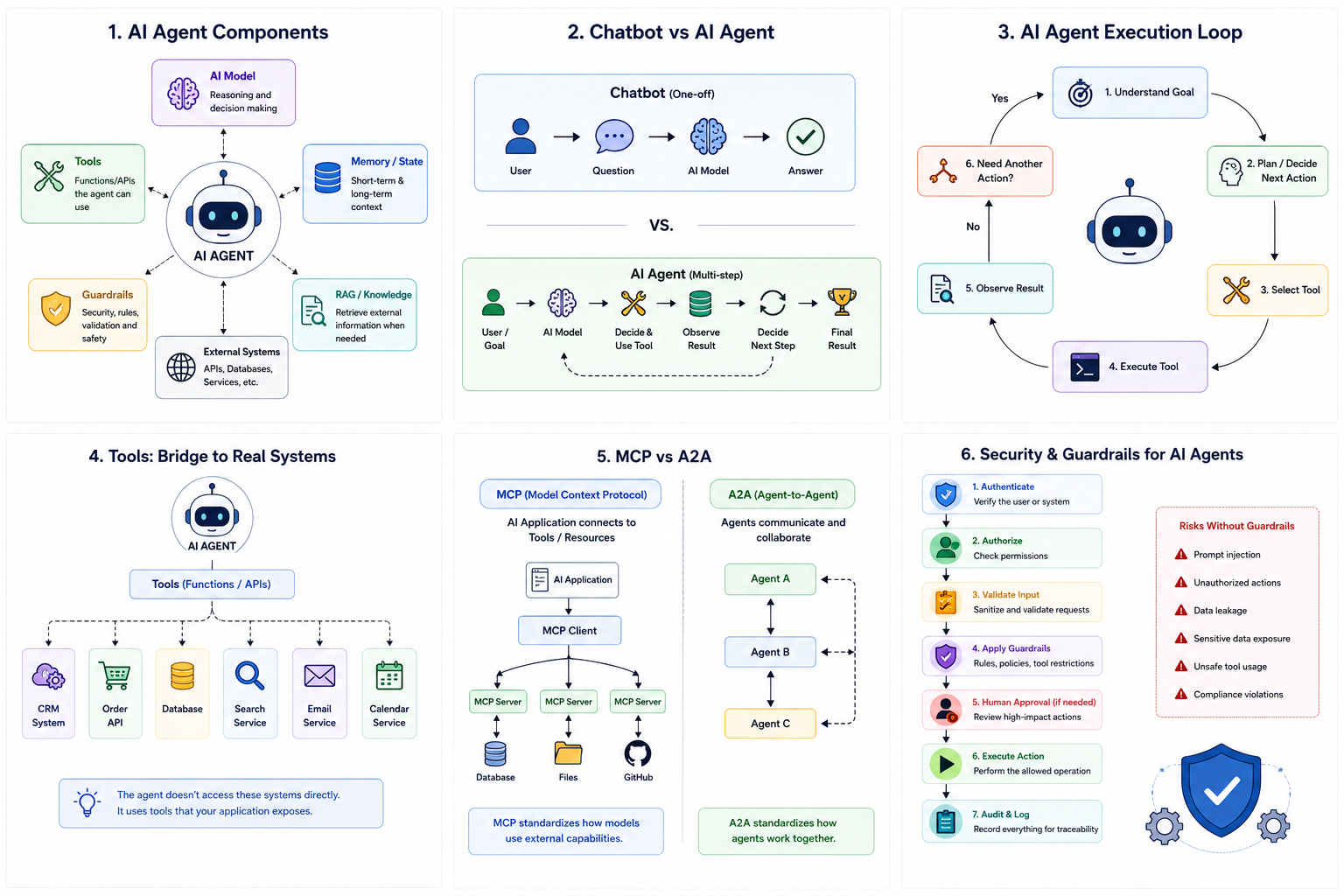 Chatbot vs Agent
Introduction
For years, most AI applications followed a simple pattern:
User → Question → AI Model → Answer
You ask something, the model generates a response, and the interaction ends.
That approach is still useful. If you want to summarize a document, explain a programming concept, or generate an email, a normal AI model may be all you need.
But consider a different request:
"Find my unpaid invoices from last month, identify the customers, check their contact details, send reminder emails, and create a report."
This is no longer just a question.
The application needs to retrieve information, decide what to do next, call several systems, inspect the results, and potentially ask a human before performing an important action.
This is where AI Agents become interesting.
An AI Agent is not simply a chatbot with a longer prompt. It is an application built around an AI model that can work toward a goal by selecting tools, using external information, observing results, and continuing the workflow.
The important question for developers is therefore not just:
What is an AI Agent?
It is:
How should I design one as a real software system?
Deep Dive & Architecture
What Exactly Is an AI Agent?
A simple way to think about an Agent is:
Goal → Decide → Tool → Result → Decide Again → Complete
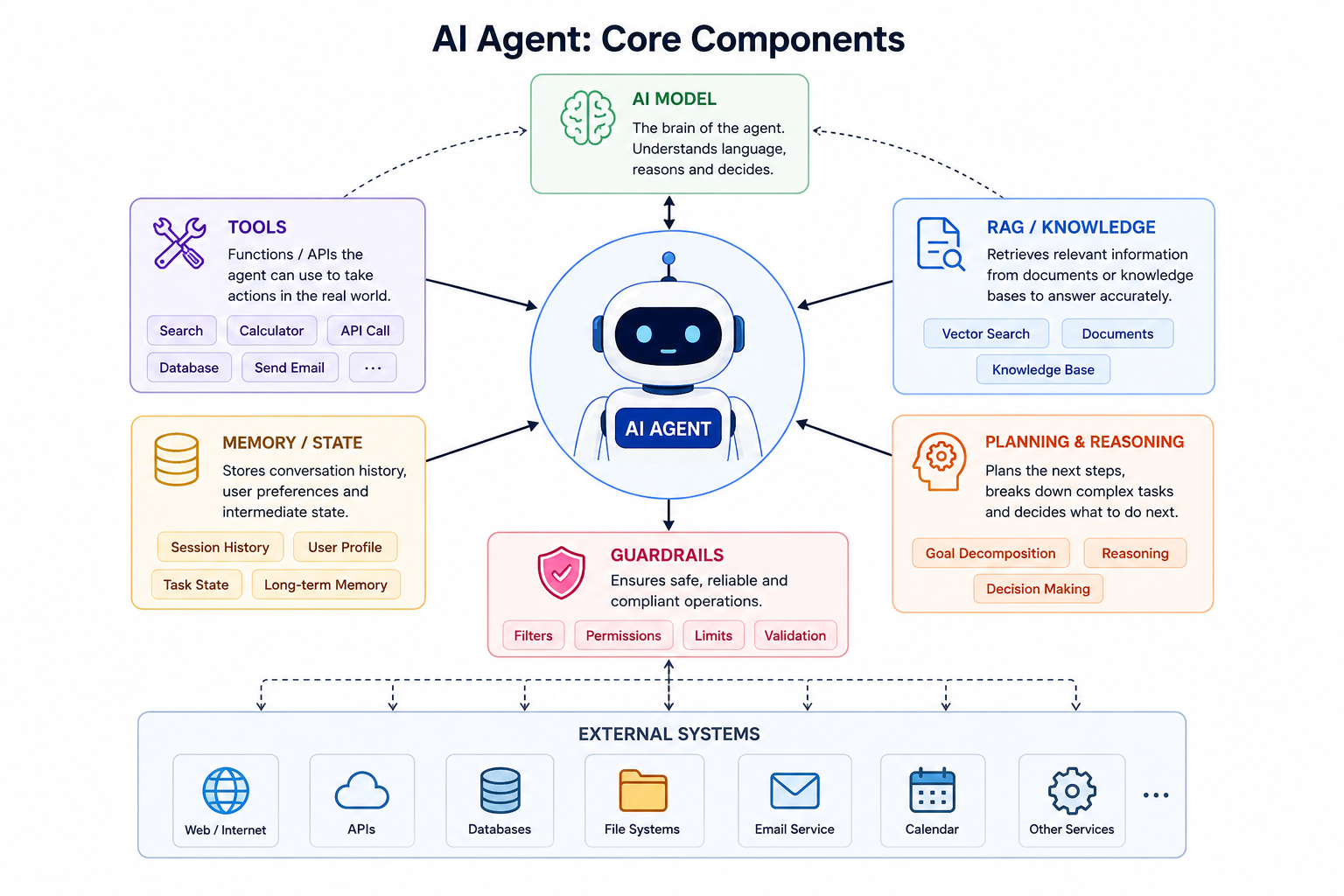
An Agent normally combines several pieces:
- AI model
- Instructions
- Tools
- Memory or state
- External data
- Execution loop
- Guardrails
- Application services
The model provides the intelligence needed to interpret the task and select the next action.
The surrounding application controls what the model is actually allowed to do.
Code Mastery LabCode Mastery Lab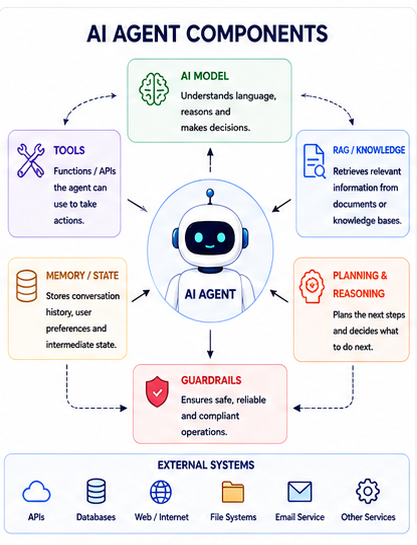 ai_agents_agent-components
For example, an Agent might look like this:
                   ┌──────────────┐
                   │   AI Model   │
                   └──────┬───────┘
                          │
              ┌───────────┼───────────┐
              ↓           ↓           ↓
           Tools       Memory       RAG
              │           │           │
              ↓           ↓           ↓
            APIs        State       Documents
              │
              ↓
        External Systems
That distinction matters in production.
An Agent should not have unrestricted access to your infrastructure simply because the underlying model is capable of generating tool calls.
The application should decide which capabilities are exposed and what permissions those capabilities have.
Chatbot vs AI Agent
A traditional chatbot generally follows:
User
 ↓
Question
 ↓
AI Model
 ↓
Answer
An Agent follows a different pattern:
User
 ↓
Goal
 ↓
AI Model
 ↓
Choose Action
 ↓
Use Tool
 ↓
Observe Result
 ↓
Choose Next Action
 ↓
Final Result
Consider these two requests.
Request 1:
"What's the weather in Delhi?"
A simple API call can solve this.
Request 2:
"Check tomorrow's weather in Delhi, find a suitable time for my outdoor event, and add it to my calendar."
Now the application may need to:
- Query a weather service.
- Understand the forecast.
- Determine a suitable time.
- Check calendar availability.
- Create a calendar event.
The second problem has a goal and several possible actions.
That is where an Agent can make sense.
Code Mastery LabCode Mastery Lab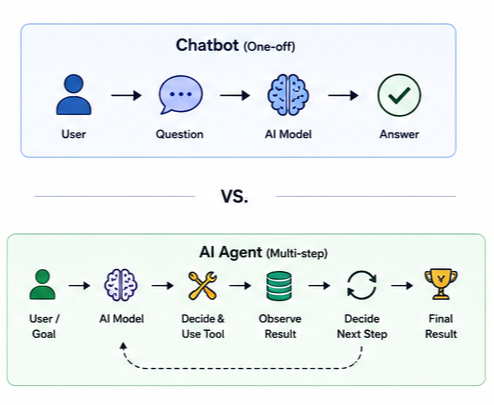 Chatbot vs Agent
The key difference: a chatbot mainly generates a response, while an Agent can use the response as part of a larger execution process.
How the Agent Execution Loop Works
The execution loop is the core idea behind an Agent.
Suppose the user says:
"Find my unpaid invoices and email reminders to the customers."
The Agent might go through the following process:
- Understand the goal.
- Identify the information it needs.
- Call the invoice service.
- Inspect the returned invoices.
- Identify unpaid invoices.
- Retrieve customer contact information.
- Generate reminder messages.
- Send the emails.
- Report the result.
The important part is that the next step can depend on the result of the previous step.
If there are no unpaid invoices, the Agent doesn't need to send an email.
If an invoice is missing customer information, it may need another lookup.
Code Mastery LabCode Mastery Lab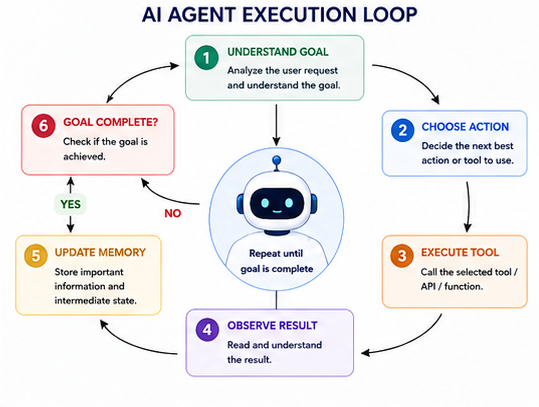 Executionloop
A useful mental model is:
Understand Goal
      ↓
Choose Action
      ↓
Execute Tool
      ↓
Observe Result
      ↓
Is the Goal Complete?
      ↓
   No ──────────────→ Choose Another Action
      │
     Yes
      ↓
Final Response
This loop is what makes an Agent different from a simple one-shot LLM call.
The Role of the AI Model
The AI model is not the entire Agent.
This is an important distinction.
An application may expose functions such as:
get_customer()
get_orders()
search_products()
send_email()
create_ticket()
The model can determine that one of these capabilities is required.
But the application executes the actual function.
For example:
AI Model
   │
   │ "I need order information"
   ↓
Tool Request
   │
   ↓
Application
   │
   ↓
Order API
   │
   ↓
Order Result
   │
   ↓
AI Model
   │
   ↓
Final Answer
This is generally called tool calling or function calling.
The important engineering principle is that the AI model decides what it needs, while your application remains responsible for how that operation is executed.
Building a Small Agent
Python is a convenient way to see the basic structure without introducing a large application framework.
import asyncio

from agents import Agent, Runner, function_tool


@function_tool
def get_order_status(order_id: str) -> str:
    """Return the current status of an order."""

    # In a real application, call your Order API here.
    orders = {
        "10025": "Shipped",
        "10026": "Processing",
        "10027": "Delivered",
    }

    return orders.get(order_id, "Order not found")


agent = Agent(
    name="Order Assistant",
    instructions=(
        "Help users check order status. "
        "Use get_order_status when an order ID is provided."
    ),
    tools=[get_order_status],
)


async def main():
    result = await Runner.run(
        agent,
        "What is the status of order 10025?"
    )

    print(result.final_output)


if __name__ == "__main__":
    asyncio.run(main())
The get_order_status() function is ordinary application code.
The Agent does not magically know the database or API implementation behind it.
The function becomes a controlled capability that the Agent can request.
That separation is exactly what you want in a production system.
Tools: The Bridge to Real Systems
Tools are what allow an Agent to move from generating text to performing useful work.
A tool can wrap:
- REST APIs
- Databases
- Search systems
- File systems
- Email services
- Calendar systems
- Internal applications
- Code execution environments
A typical Agent might have access to:
                    AI Agent
                       │
        ┌──────────────┼──────────────┐
        ↓              ↓              ↓
   Customer API     Order API     Search API
        │              │              │
        └──────────────┼──────────────┘
                       ↓
                   Final Result
The key engineering principle is controlled access.
Instead of giving an Agent a generic database connection, expose narrowly defined functions such as:
get_customer()
get_order()
create_ticket()
This gives you much better control over authorization, logging, validation, and failure handling.
Code Mastery LabCode Mastery Lab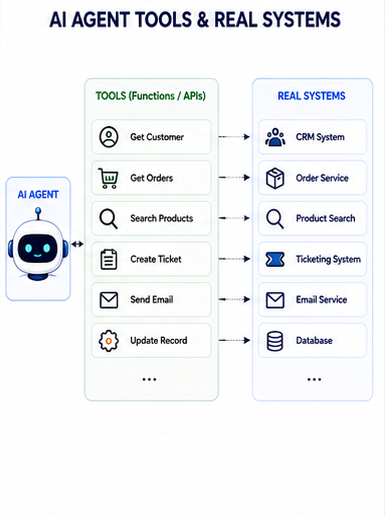 toolsandrealsystem
Notice that the Agent isn't directly connected to every system in your infrastructure.
The tool layer acts as a controlled boundary.
Memory and State
"Memory" can mean several different things in an Agent application.
Conversation history
Previous messages from the current conversation.
Short-term state
Information required to complete the current task.
customerId = 1024
orderId = 10025
taskStatus = "waiting_for_shipping"
Long-term memory
Information that an application deliberately stores for future interactions.
Database-backed information
Business data such as orders, customers, invoices, and tickets.
Vector search
A mechanism for finding semantically relevant information, often used with RAG.
These concepts should not be treated as interchangeable.
For example, storing an order in PostgreSQL is not the same thing as storing conversation history, and neither is automatically the same as RAG.
Where RAG Fits Into an Agent
RAG stands for Retrieval-Augmented Generation.
The basic idea is simple:
Instead of expecting the model to know everything, retrieve relevant information from an external knowledge source and provide it to the model.
Imagine an HR Agent receiving:
"What is our company's maternity leave policy?"
The workflow could be:
User Question
      ↓
AI Agent
      ↓
Search HR Documents
      ↓
Retrieve Relevant Sections
      ↓
AI Model
      ↓
Answer
The important distinction is:
RAG helps answer: "What information do I need?"
Tools help answer: "What action do I need to perform?"
A real Agent can use both.
For example:
"Read the refund policy and refund this order if the customer is eligible."
The Agent might:
                    Agent
                      │
          ┌───────────┴───────────┐
          ↓                       ↓
       RAG Search              Order Tool
          ↓                       ↓
    Refund Policy             Order Data
          │                       │
          └───────────┬───────────┘
                      ↓
                Make Decision
                      ↓
                Refund Tool
Code Mastery LabCode Mastery Lab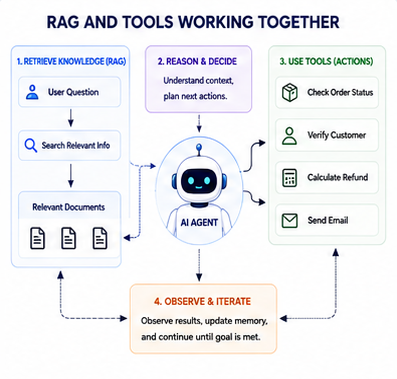 Ragandtool
This combination is one of the most useful patterns for practical Agent systems.
What Is MCP?
Model Context Protocol, or MCP, addresses a different problem: how AI applications connect to tools and resources in a consistent way.
Without a common protocol, an AI application may need a different integration approach for every external system.
For example:
AI Application
    ├── Custom GitHub integration
    ├── Custom database integration
    ├── Custom file integration
    └── Custom internal API integration
MCP provides a standardized protocol for connecting AI applications with external capabilities.
A simplified architecture looks like this:
                    AI Application
                          │
                     MCP Client
                          │
            ┌─────────────┼─────────────┐
            ↓             ↓             ↓
       MCP Server     MCP Server     MCP Server
            ↓             ↓             ↓
         GitHub        Database        Files
MCP is useful, but it is not mandatory.
You can build an Agent entirely around your own functions and APIs.
Use MCP when a standardized integration model provides value for your architecture.
Code Mastery LabCode Mastery Lab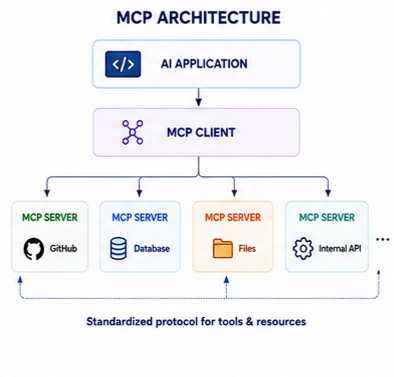 McpArchitecture
MCP vs A2A
Another term that appears frequently in Agent discussions is A2A, or Agent-to-Agent communication.
The concepts are related but solve different problems.
A simplified distinction is:
MCP

AI Application
      ↓
Tools / Data / Resources


A2A

Agent A
   ↓
Agent B
   ↓
Agent C
MCP is primarily about connecting an AI application with tools and resources.
A2A is about enabling independent Agents to communicate and work together.
For example:
Customer Support Agent
          │
          │ A2A
          ↓
     Billing Agent
          │
          │ MCP
          ↓
      Billing API
This distinction becomes increasingly important as systems move from individual Agents toward networks of specialized Agents.
Code Mastery LabCode Mastery Lab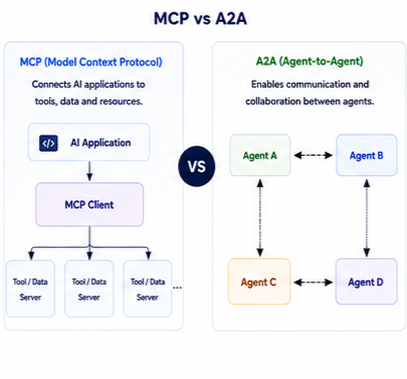 MCPVS2A
A More Realistic Production Architecture
A production Agent should be treated as a software system, not just a prompt.
A practical architecture may contain:
                         User
                           │
                           ↓
                     API Gateway
                           │
                           ↓
                    Agent Service
                           │
             ┌─────────────┼─────────────┐
             ↓             ↓             ↓
          AI Model      Memory/RAG     Tool Layer
                                           │
                           ┌───────────────┼──────────────┐
                           ↓               ↓              ↓
                          CRM             ERP          Database
Around this core, production systems typically need:
- Authentication
- Authorization
- Input validation
- Tool restrictions
- Logging
- Metrics
- Tracing
- Retry handling
- Timeouts
- Rate limiting
- Cost controls
- Human approval
The Agent should coordinate these capabilities without becoming a replacement for the underlying business services.
System Architecture Diagram
Multi-Agent Systems
There are situations where several specialized Agents make sense.
For example:
                    Supervisor Agent
                           │
             ┌─────────────┼─────────────┐
             ↓             ↓             ↓
       Research Agent  Coding Agent  Support Agent
A research Agent can focus on gathering information.
A coding Agent can work with repositories.
A support Agent can handle customer requests.
The Supervisor can decide which specialist should handle a particular task.
But this architecture adds complexity.
You now have to think about:
- Agent communication
- State
- Permissions
- Context
- Error handling
- Observability
- Cost
- Coordination
A single Agent is often better when the task is small.
Start with one Agent. Add more only when the separation solves a real architectural problem.
Security Problems You Should Not Ignore
The moment an Agent can perform actions, security becomes more important.
Consider an Agent with this tool:
delete_customer(customer_id)
The fact that the model can request the tool does not mean the application should execute every request.
A safer architecture is:
User
 ↓
Authenticate
 ↓
Authorize
 ↓
Validate Tool Request
 ↓
Apply Guardrails
 ↓
Human Approval if Required
 ↓
Execute
 ↓
Audit Log
Potential risks include:
- Prompt injection
- Tool misuse
- Excessive permissions
- Sensitive data exposure
- Data leakage
- Unauthorized actions
- Malicious instructions inside retrieved documents
- Unsafe API calls
Code Mastery LabCode Mastery Lab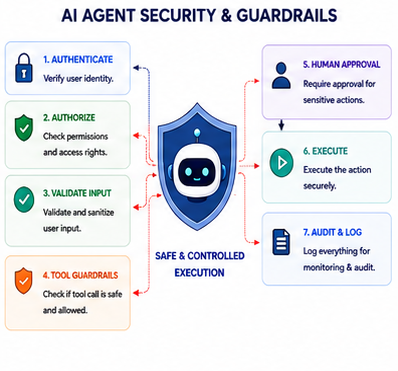 AiAgentSecurity
For high-impact operations such as deleting data, issuing refunds, changing permissions, or sending sensitive information, a human approval step can be appropriate.
When Should You Use an AI Agent?
AI Agents are a good fit when the task has some flexibility.
Good examples include:
- Customer support workflows
- IT support
- Research assistants
- Developer assistants
- Data analysis
- Internal business automation
- Document processing
- Ticket investigation
But not every problem needs AI.
Avoid an Agent when you simply need:
- A basic CRUD operation
- Email validation
- Fixed calculations
- Deterministic business rules
- A simple API lookup
- A fixed workflow
If the process is:
Step 1 → Step 2 → Step 3 → Step 4
and those steps never change, normal application code is usually easier to test and maintain.
AI Agent vs Traditional Workflow
This is one of the most important architectural decisions.
A traditional workflow might look like:
Receive Order
      ↓
Validate Payment
      ↓
Check Inventory
      ↓
Create Shipment
      ↓
Send Email
The behavior is predictable.
An Agent is more flexible:
Goal
 ↓
Decide Next Action
 ↓
Execute
 ↓
Observe
 ↓
Decide Again
The tradeoff is straightforward:
| Traditional Workflow | AI Agent |
|---|---|
| Predictable | Flexible |
| Deterministic rules | Model-driven decisions |
| Easier to test | Requires broader evaluation |
| Fixed sequence | Dynamic sequence |
| Lower uncertainty | Higher uncertainty |
| Excellent for known processes | Useful for open-ended tasks |
The best production architecture may combine the two.
For example, an Agent could investigate a customer issue and then invoke a traditional refund workflow once eligibility has been established.
System Architecture Diagram
This diagram shows the central Agent loop without hiding the supporting systems.
Visual Breakdown & Concept Diagram
The most useful way to visualize an Agent is not as a futuristic robot.
Think of it as an orchestration layer between a goal and the software systems that can accomplish that goal.
The central idea is simple:
The model helps decide what to do, while normal software remains responsible for performing and controlling those actions.
Code Mastery LabCode Mastery Lab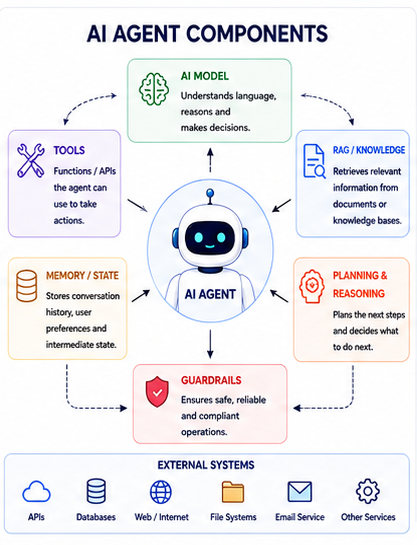 ai_agents_agent-components
This is why good Agent architecture looks much more like normal software architecture than a collection of prompts.
Key Takeaways & Best Practices
- An AI Agent is more than an LLM. It combines a model with tools, state, external data, execution logic, and safety controls.
- Start with the problem, not the Agent. If a normal API or workflow solves the problem reliably, use it.
- Keep tools narrow and intentional. Give an Agent the smallest set of capabilities it actually needs.
- RAG and tools have different jobs. RAG retrieves knowledge; tools perform actions.
- MCP is optional. It provides a standardized way to connect AI applications with tools and resources.
- Use multi-Agent designs carefully. Add specialist Agents only when their separation provides a real benefit.
- Treat security as part of the architecture. Authentication, authorization, validation, guardrails, approval, and audit logging should not be added as an afterthought.
- Keep business rules outside the model. Let the Agent decide which capability it needs, but let normal application services enforce business rules.
- Measure Agent behavior. Track tool calls, errors, latency, token usage, and task success.
- Start small. A single Agent with two or three well-designed tools is usually a better starting point than a complex multi-Agent platform.
Conclusion
AI Agents are changing the way developers build AI-powered applications.
The interesting shift is not simply that models can generate better text.
It is that an AI model can now be placed inside a software system where it can interpret a goal, select from controlled capabilities, retrieve information, inspect results, and continue working until the task is complete.
But that does not make traditional software engineering less important.
It makes it more important.
The Agent still needs well-designed APIs.
It still needs authorization.
It still needs validation.
It still needs logging, monitoring, retries, timeouts, and clear business rules.
A good starting point is simple:
Choose one real workflow, expose two or three safe tools, add RAG only when external knowledge is required, and measure how reliably the Agent completes the task.
Once that works, expand carefully.
The goal should not be to make an Agent autonomous just because the technology allows it.
The goal should be to build software where AI can understand a goal, work with existing systems, and safely help complete the job.
That is where AI Agents become useful engineering tools rather than just another layer of AI terminology.
Verified Developer on Code Mastery Lab